Unity에서의 클래스(1) 클래스 정의 및 오브젝트 생성
Unity는 C#을 바탕으로 코딩을 한다.
Unity에서의 클래스 예제는 다음과 같다.
가령 Animal 클래스를 만든다고 하면
|
1
2
3
4
5
6
7
8
9
10
11
12
13
14
|
//Animal.cs
using System.Collections;
using System.Collections.Generic;
using UnityEngine;
public class Animal {
public string name;
public string sound;
public void PlaySound()
{
Debug.Log(name + " : " + sound);
}
}
|
|
다음과 같이 Animal 클래스를 만들었다.
현재 Animal 클래스는 이름(name)과 소리(sound)를 가지고 있고
PlaySound()라는 기능을 가지고 있다.
자, 이제 클래스라는 틀을 만들었으니 실제로 사용하려면 클래스를 이용해 인스턴스 즉 오브젝트를 만들어야한다
|
1
2
3
4
5
6
7
8
9
10
11
12
13
14
15
16
17
18
19
20
21
22
|
//Zoo.cs
using System.Collections;
using System.Collections.Generic;
using UnityEngine;
public class Zoo : MonoBehaviour
{
// Start is called before the first frame update
void Start()
{
Animal tom = new Animal();
tom.name = "톰";
tom.sound = "냐옹!";
tom.PlaySound();
}
// Update is called once per frame
void Update()
{
}
}
|
|
일단 위의 Animal 클래스에서 딱히 생성자에 대한 정의를 하지 않았기에 기본 생성자가 암시적으로 생성된다.
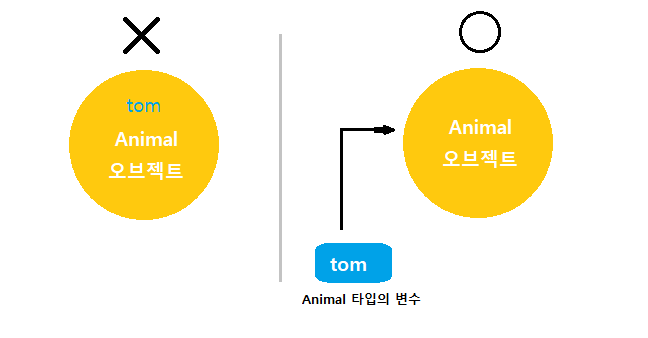
자, Animal 클래스 타입의 tom 을 생성하고 new 연산자를 통해 생성한 Animal 오브젝트를 Animal 타입의 변수인
tom 에 할당 하였다.
즉, tom은 방금 생성한 Animal 오브젝트를 가리키게 된다.
Animal 클래스에서 접근 제한자를 public 으로 해놓았기에 점(.) 연산자로 변수와 메서드에 접근 가능하다.
※ 여기서 간단하게 접근 지정자 복습
public |
클래스 외부에서 멤버에 접근 가능 |
private |
클래스 내부에서만 멤버에 접근 가능 |
protected |
클래스 내부와 파생 클래스에서만 접근 가능 |
★ 클래스로 만든 변수는 참조(reference)타입이다.
int, string 등의 '원시적인 타입'의 변수들은 new 키워드를 사용하지 않고 변수에 곧바로 값을 할당한다.
int year = 1993;
string birthday = "당신이 태어난 연도";
하지만 클래스로 만든 변수는
Animal tom = new Animal();
와 같이 Animal 오브젝트를 생성하고 tom에 할당하였다.
★ 참조 타입 변수는 그 자체로 실체화된 오브젝트가 아니다.
따라서 new를 사용해 오브젝트를 개별적으로 생성해야 한다.
따라서 예제의 Animal 타입의 변수 tom은 생성된 Animal 오브젝트 그 자체가 아니다.
1)tom은 생성된 Animal 오브젝트를 '가리키는 참조값을 저장하는 변수'이다.
2)tom에 할당된 값은 new로 생성된 Animal 오브젝트가 아니라 생성된 Animal 오브젝트로 향하는 참조값이다.
|
1
2
3
4
5
6
7
8
9
10
11
12
13
14
15
16
17
18
19
20
21
22
23
24
25
|
//Zoo.cs
using System.Collections;
using System.Collections.Generic;
using UnityEngine;
public class Zoo : MonoBehaviour
{
// Start is called before the first frame update
void Start()
{
Animal tom = new Animal();
Animal jerry = new Animal();
tom.name = "톰";
tom.sound = "냐옹!";
jerry.name = "제리";
jerry.sound = "찍찍";
tom.PlaySound();
jerry.PlaySound();
}
// Update is called once per frame
void Update()
{
}
}
|
|
Animal 클래스를 이용해 또 다른 jerry 오브젝트를 만들었다.
Unity Editor 에서 Create Empty로 GameObject를 만들고 Zoo.cs 스크립트 파일을 드래그 해서 GameObject에 넣는다.
그 뒤 Unity Editor에서 실행결과는 다음과 같다.
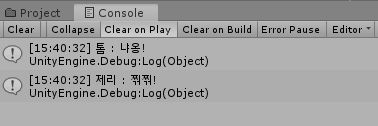
tom과 jerry는 자신만의 값이 할당된 name과 sound를 가지고 있다.
※ 내용 요약
· 클래스는 오브젝트를 생성하는 틀이다.
· new를 사용하여 클래스로부터 오브젝트를 생성한다.
· 한 클래스로 여러 오브젝트를 만들 수 있다.
· 클래스로 만든 변수는 참조(reference)타입이다.